



Every game starts as an idea that feels fantastic in your head. The risk is that you spend months and a large budget building it, only to discover that the core experience is not as fun as you imagined. Prototyping is how you find that out in weeks instead.
A prototype is not a small version of the finished game. It is an experiment designed to answer a specific question as cheaply as possible. This guide walks through a simple process you can follow whether you are a solo developer or a studio.
Why prototype before production
- Reduce risk. Finding a weak core mechanic early costs days. Finding it in full production costs months.
- Align the team. Something playable ends debates faster than a design document.
- Show, do not tell. Publishers and investors respond far better to a playable build than to slides.
- Learn what players actually do. People rarely behave the way designers expect.
Step 1: Define the one question you need to answer
Start with a single sentence: Is it fun to do X? For example, is it satisfying to swing across gaps, to merge items, or to manage a tiny restaurant under time pressure? That repeated action is your core loop, the thing players will do hundreds of times. Your prototype should prove that this loop is enjoyable before anything else is built.
Step 2: Choose the right type of prototype
Different questions call for different prototypes. Match the format to what you need to learn:
| Prototype type | Best for | Typical effort |
|---|---|---|
| Paper or tabletop | Rules, balance, turn-based and card mechanics | Hours to days |
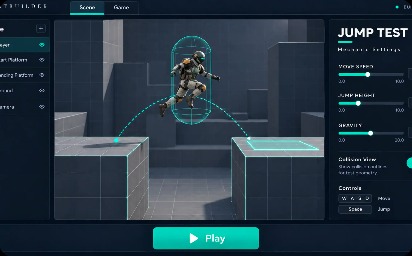
| Greybox (digital, placeholder art) | Movement, controls, level flow, game feel | Days to 2 weeks |
| Vertical slice | Proving quality, art direction and technical feasibility in one polished section | Weeks to a few months |
Most ideas should start with paper or greybox. A vertical slice is valuable later, usually when you are pitching or confirming that the full production plan is realistic.
Step 3: Pick tools you can move fast in
The best tool is the one your team already knows. Unity and Unreal Engine are common for 3D and mobile, Godot is a lightweight open-source option, and many 2D ideas can be tested quickly in simpler engines. Use placeholder shapes, free assets and rough sounds. Prototype code can be messy because you expect to throw it away.
Step 4: Timebox and cut scope hard
Give the prototype a fixed time limit, often one to three weeks, and write down what is out of scope: menus, saving, progression, polish, monetisation. If a feature does not help answer your question, leave it out. A prototype that tests one thing well is more useful than one that does ten things badly.
Step 5: Playtest early and watch, do not explain
As soon as the loop works, put it in front of people who were not involved in making it. Then do the hard part: stay quiet.
- Give testers no instructions beyond what a new player would see.
- Watch where they hesitate, get confused or smile.
- Note what they do, not just what they say afterwards.
- Test with a handful of people at a time and fix the biggest problems before the next round.
If you have to keep explaining how the game works, that is useful information. It means the design is not communicating clearly yet.
Step 6: Decide what success looks like
Before testing begins, agree on signals that tell you the idea is working. Examples include how quickly players understand the goal, whether they choose to play another round without being asked, and whether they can describe what they enjoyed. For mobile and free-to-play ideas, a prototype can also be used to look at early retention signals, though small samples should be treated as hints rather than proof.
Step 7: Decide to go, change or stop
At the end of the timebox, make a clear decision:
- Go. The loop is fun and feasible. Plan production.
- Change. There is something promising, but a key mechanic needs to be rethought. Run another short prototype.
- Stop. The idea is not working. Ending it now is a success, because it freed time and budget for a better one.
Common prototyping mistakes
- Polishing visuals before the mechanic is proven.
- Letting the prototype grow into a half-built game.
- Testing only with friends and teammates who want you to succeed.
- Ignoring technical risks, such as performance on low-end phones or multiplayer networking.
- Starting without agreeing what result would make you stop.
What to carry into production
A good prototype leaves you with more than a playable build. You should come out with a confirmed core loop, a short list of design decisions, known technical risks, early art and tone direction, and a realistic scope for the first release. That is the foundation of a production plan you can trust.
If you have a game idea and want help validating it, our game development team can build a prototype, run playtests and help you plan the path to launch. Share your concept below and we will take it from there.